
Runtime Environment
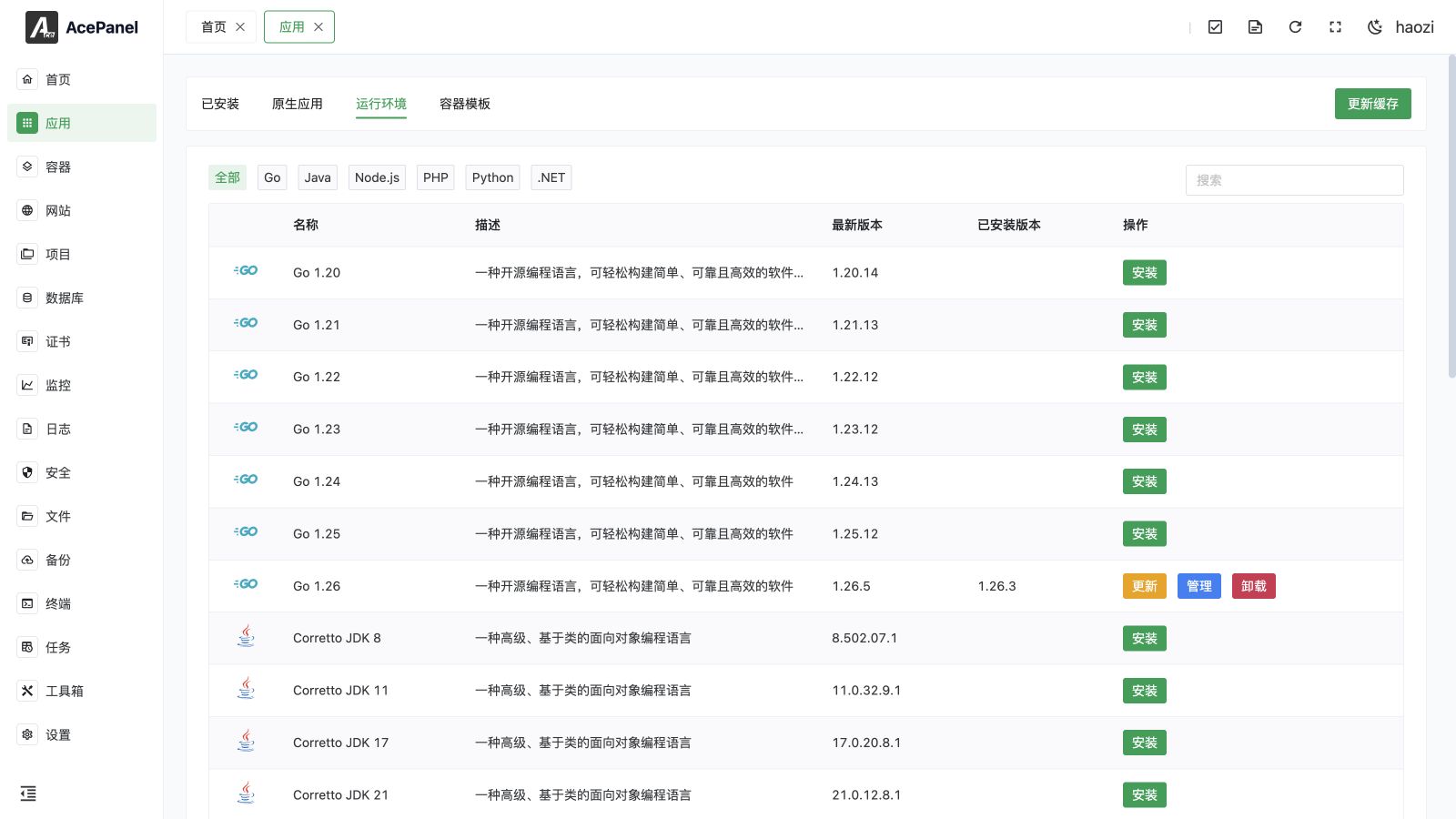
Runtime environments are used to install runtimes for various programming languages, providing execution environments for websites and projects.
Supported Languages
AcePanel supports runtime environments for the following programming languages:
| Language | Available Versions | Description |
|---|---|---|
| Go | 1.20 - 1.25 | Suitable for building high-performance backend services |
| Java | JDK 8, 11, 17, 21, 25 | Uses Amazon Corretto distribution |
| Node.js | 20, 22, 24 | Suitable for frontend builds and Node applications |
| PHP | 7.4 - 8.5 | Suitable for Web development |
| Python | 3.10 - 3.14 | Suitable for scripts and Web applications |
| .NET | LTS / STS releases | Cross-platform framework for modern apps and services |
Runtime Environment List
Go to the Apps page, click the Runtime Environment tab to view available runtime environments:
Click the language category at the top to filter versions for a specific language, or use the search box on the right to search by name or description:
Install Runtime Environment
- Go to the Apps page
- Click the Runtime Environment tab
- Select the desired language category (or view all)
- Click the Install button for the corresponding version
When the runtime offers them, the install dialog also accepts a Pre-execution Script and Custom Compile Parameters. Leave them empty unless the build needs a known dependency, mirror, patch, or compiler option. The script runs with installation privileges, so review it before submitting the task.
Version Selection Recommendations
- Production environments are recommended to use LTS (Long Term Support) versions
- Versions marked "End of Life" are not recommended for new projects
- Multiple versions can be installed simultaneously and specified for use in projects
Manage Runtime Environment
Installed runtime environments will display a Manage button. Click to enter the management page:
Running Status
Displays the current status of the runtime environment, providing operations such as start, stop, restart, and reload.
Module Management (PHP)
PHP runtime environment provides module management functionality, allowing installation or uninstallation of various PHP modules:
The Module Management tab lists every available module with its name, description, and an Install / Delete action. Installing or uninstalling a module is submitted as a background task; check the result in Tasks > Panel Tasks.
A wide catalog of modules is available, including (but not limited to):
- Caching / Serialization: OPcache (bytecode cache), APCu (user-level in-memory key-value cache), igbinary, Redis (requires igbinary), Memcached
- Imaging / Files: ImageMagick, exif, fileinfo, zip, bz2, zstd, xlswriter (Excel)
- Databases: pgsql and pdo_pgsql (PostgreSQL), sqlsrv and pdo_sqlsrv (SQL Server)
- Networking / Protocols: ssh2, snmp, ldap, imap, event, grpc, protobuf, rdkafka (Kafka)
- Internationalization / Text: intl, gettext, enchant, pspell, readline, yaml, xsl
- System V IPC: sysvmsg, sysvsem, sysvshm
- Math: gmp, calendar
- Profiling / Debugging: xhprof, xdebug
- High-performance / Encryption: Swoole, Swow, ionCube (must be installed after OPcache)
Version-Aware Availability
The module catalog adapts to the selected PHP version:
- Swow is only available on PHP 8.0 and later
- pspell and imap are removed on PHP 8.4 and later (no longer recommended)
- OPcache is no longer offered as an installable module on PHP 8.5 and later, since it is built in natively
Configuration Files (PHP)
You can edit PHP's main configuration file (php.ini) via the Main Configuration tab and the FPM configuration file via the FPM Configuration tab using a built-in editor. The View PHPInfo button on the running status page shows the full phpinfo() output.
Parameter Tuning (PHP)
The Parameter Tuning tab provides a form-based way to adjust common settings without editing the raw configuration. It is organized into the following sections:
- General:
short_open_tag,date.timezone,display_errors, anderror_reporting - Disabled Functions: a comma-separated list of PHP functions to disable (e.g.
exec,shell_exec,system,passthru) - Upload Limits:
upload_max_filesize,post_max_size,max_file_uploads, andmemory_limit - Timeout Limits:
max_execution_time,max_input_time, andmax_input_vars - Performance Tuning: PHP-FPM process manager settings (
pm,pm.max_children, and, fordynamicmode,pm.start_servers,pm.min_spare_servers,pm.max_spare_servers) - OPcache: bytecode-cache options and JIT mode/buffer settings
- Session:
session.save_handler(files, redis, or memcached), the matching connection details or save path,session.gc_maxlifetime, andsession.cookie_lifetime. A Clean Session Files button deletes all session files; it only takes effect when the save handler is set tofiles
PHP Under OpenLiteSpeed
OpenLiteSpeed handles PHP through LSAPI and manages lsphp processes itself. When LSAPI takes over, AcePanel stops and disables the corresponding PHP-FPM service. A stopped PHP-FPM status is expected in this mode and does not mean the website is down.
FPM process-manager settings and FPM load metrics do not control LSAPI workers. Use the OpenLiteSpeed application page for live server status. Saving PHP configuration in LSAPI mode restarts the relevant PHP workers; reloading OpenLiteSpeed also restarts its PHP child processes.
FPM Processes, OPcache, and Composer
- Load Status includes FPM worker details when PHP-FPM is in use. Under LSAPI, the page explains that FPM metrics do not apply.
- OPcache shows cache usage, hit statistics, and cached scripts, and provides Reset OPcache. Status is also available under LSAPI. The extension must be enabled, and the PHP runtime must be available to query it.
- Composer shows the installed version, supports installation or update through a background task, and lets you choose the package mirror for that PHP version.
The Parameter Tuning > OPcache section exposes OPcache and JIT settings, including cache memory and JIT buffer configuration. Review the settings for the selected PHP version and save to apply them. Where available, Generate Recommended Configuration fills the form from a server profile for review before saving.
Logs (PHP)
The PHP runtime environment provides a separate Load Status tab (FPM pool load), along with Runtime Logs, Error Logs, and Slow Logs tabs for monitoring and troubleshooting.
Language-Specific Settings
Some runtime environments provide dedicated settings on their management page:
- Go: Configure the module proxy (
GOPROXY), with presets for the official proxy and mirrors such as goproxy.cn, Alibaba, and Tencent - Node.js: Configure the npm registry, with presets for the official registry and mirrors such as npmmirror, Tencent, and Huawei
- Python: Configure the pip mirror, with presets for the official source and mirrors such as Alibaba, Tencent, Tsinghua, and USTC
Set as CLI Default Version
Click the Set as CLI Default Version button to set the current version as the default version used by the command line. This is available for all runtime environments (Go, Java, Node.js, PHP, Python, and .NET).
Multiple Version Coexistence
AcePanel supports multiple versions of the same language coexisting. For example, you can install both PHP 7.4 and PHP 8.3 simultaneously, and different websites can use different PHP versions.
Installation path rules:
- Go:
/opt/ace/server/go/version - Java:
/opt/ace/server/java/version - Node.js:
/opt/ace/server/nodejs/version - PHP:
/opt/ace/server/php/version - Python:
/opt/ace/server/python/version - .NET:
/opt/ace/server/dotnet/version
Using in Projects
When creating a project, you can select the runtime environment version to use in the project settings. See Project Management documentation for details.
Update Runtime Environment
When a new version is available, the latest version number will be displayed in the list. You can:
- Uninstall the old version and install the new version
- Keep the old version and install the new version simultaneously (recommended)
Note
Updating runtime environment versions may cause compatibility issues with projects that depend on that version. Please verify in a test environment before updating the production environment.