
Go Project
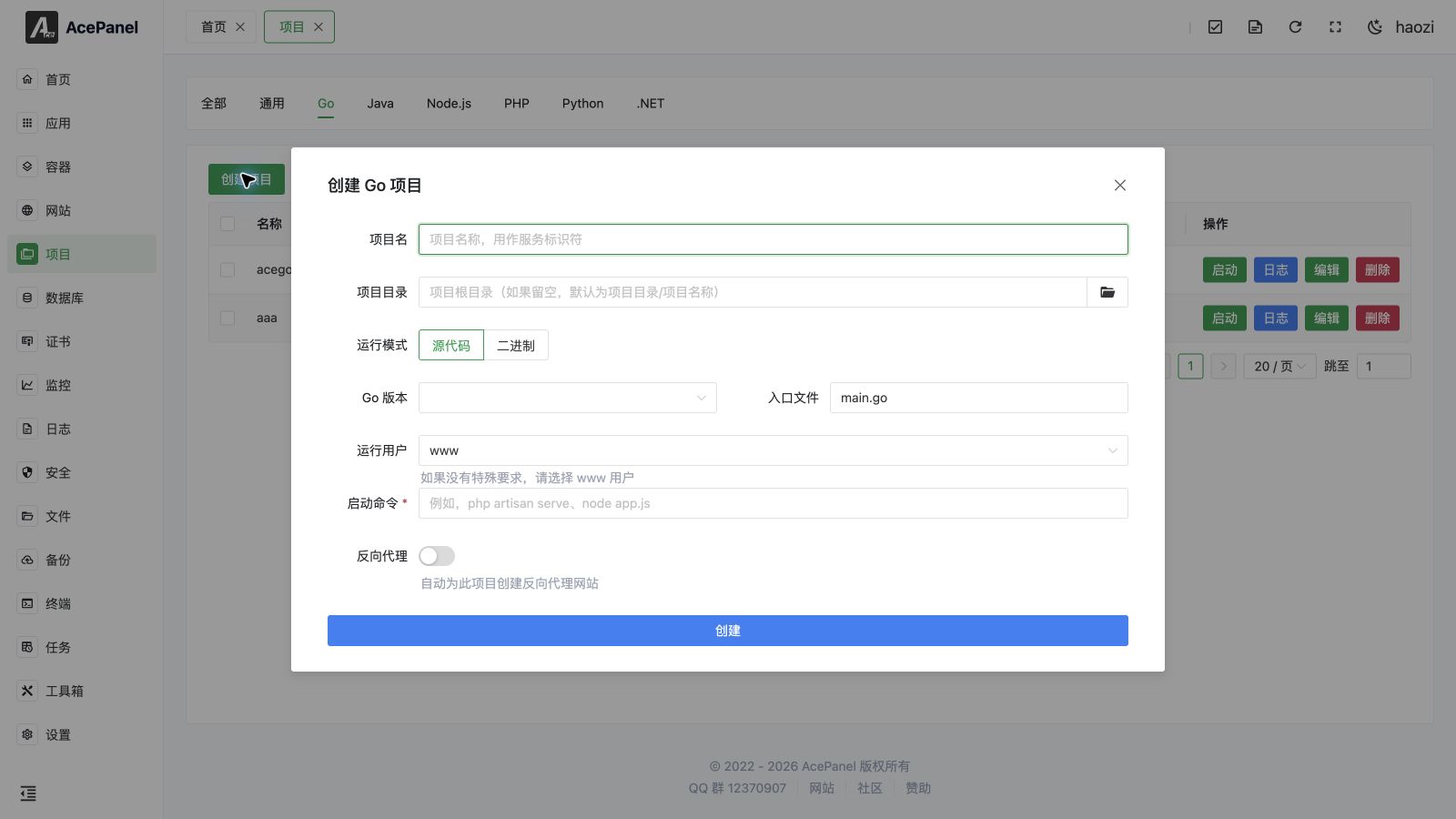
Go projects are used to deploy backend applications developed with Go language, such as Gin, Echo, Fiber frameworks.
Prerequisites
- Install Go runtime environment: Apps > Runtime Environment > Go
- Compiled Go executable file or source code
Deployment Methods
Method 1: Deploy Compiled Binary File
- Compile Go project locally:
bash
# Cross-compile for Linux amd64
GOOS=linux GOARCH=amd64 go build -o myapp- Upload binary file to server
- Create project, fill in start command:
./myapp
Method 2: Compile on Server
- Upload source code to server
- Compile in terminal:
bash
cd /opt/ace/projects/myapp
go build -o myapp- Create project, fill in start command:
./myapp
Create Go Project
- Go to the Project page, open the Go tab
- Click Create Project
- Fill in configuration:
- Project Name:
myapp(used as the service identifier) - Project Directory: leave empty to default to
/opt/ace/projects/<project name>, or pick a directory - Run Mode: select Source Code or Binary
- Source Code: choose the installed Go Version and the Entry File (e.g.,
main.go,cmd/server/main.go); the start command is generated automatically asgo<version> run <entry file> - Binary: the start command is generated as
<project directory>/main
- Source Code: choose the installed Go Version and the Entry File (e.g.,
- Run User: defaults to
www(you may also chooseroot/nobodyor enter a custom user) - Start Command: auto-filled from the options above, editable
- Project Name:
- Enable Reverse Proxy and fill in the Domain and Project Port to automatically create a reverse proxy website for external access
Managing the Project
After creation the project appears in the list on the Go tab. The Status column shows whether the service is Running, Stopped, Failed, or Inactive. For each project you can:
- Start / Stop the service
- Restart and Reload (shown only while the project is running)
- View real-time Logs
- Edit the project (see below)
- Delete the project (with a confirmation countdown)
- Toggle Autostart to enable or disable starting the service on boot
You can also select multiple projects and use the bulk Delete button.
Editing
Every project is managed as a systemd service, and the Edit dialog exposes the underlying unit configuration across several tabs. Changes are written back to the service unit file:
- Basic Settings: project name, description, project directory, working directory, and run user.
- Runtime Settings: pre-start / post-start / stop / reload commands, restart policy (
no,always,on-failure,on-abnormal,on-abort,on-success), restart interval, max restarts, start/stop timeouts, standard output / standard error targets (journal,syslog,kmsg,null, or append/truncate to a file), and environment variables. - Dependencies: control startup order with
Requires(strong),Wants(weak),AfterandBeforeunit dependencies. - Resource Limits: memory limit (MB) and CPU quota (e.g.
50%for half a core,200%for two cores). - Security Settings:
NoNewPrivileges, protect/tmp, protect/home,ProtectSystem(true/full/strict), and read-write / read-only path allowlists.
For a full explanation of every systemd directive these tabs map to, see the General Project guide.
Start Command Examples
bash
# Run compiled binary file
./myapp

# Run with specified Go version
go1.24 run main.go

# Run with parameters
./myapp -port 8080 -config ./config.yaml

# Set environment variables
GIN_MODE=release ./myapp
Common Frameworks
Gin
go
package main

import "github.com/gin-gonic/gin"

func main() {
    r := gin.Default()
    r.GET("/", func(c *gin.Context) {
        c.JSON(200, gin.H{"message": "Hello"})
    })
    r.Run(":8080")
}
Start command: GIN_MODE=release ./myapp
Echo
go
package main

import (
    "github.com/labstack/echo/v4"
)

func main() {
    e := echo.New()
    e.GET("/", func(c echo.Context) error {
        return c.String(200, "Hello")
    })
    e.Start(":8080")
}
Fiber
go
package main

import "github.com/gofiber/fiber/v2"

func main() {
    app := fiber.New()
    app.Get("/", func(c *fiber.Ctx) error {
        return c.SendString("Hello")
    })
    app.Listen(":8080")
}
Notes
- Ensure binary file has execute permission:
chmod +x myapp - Production environments are recommended to use compiled binary files, not
go run - It is recommended to use environment variables or configuration files to manage configuration, avoid hardcoding