
Panel
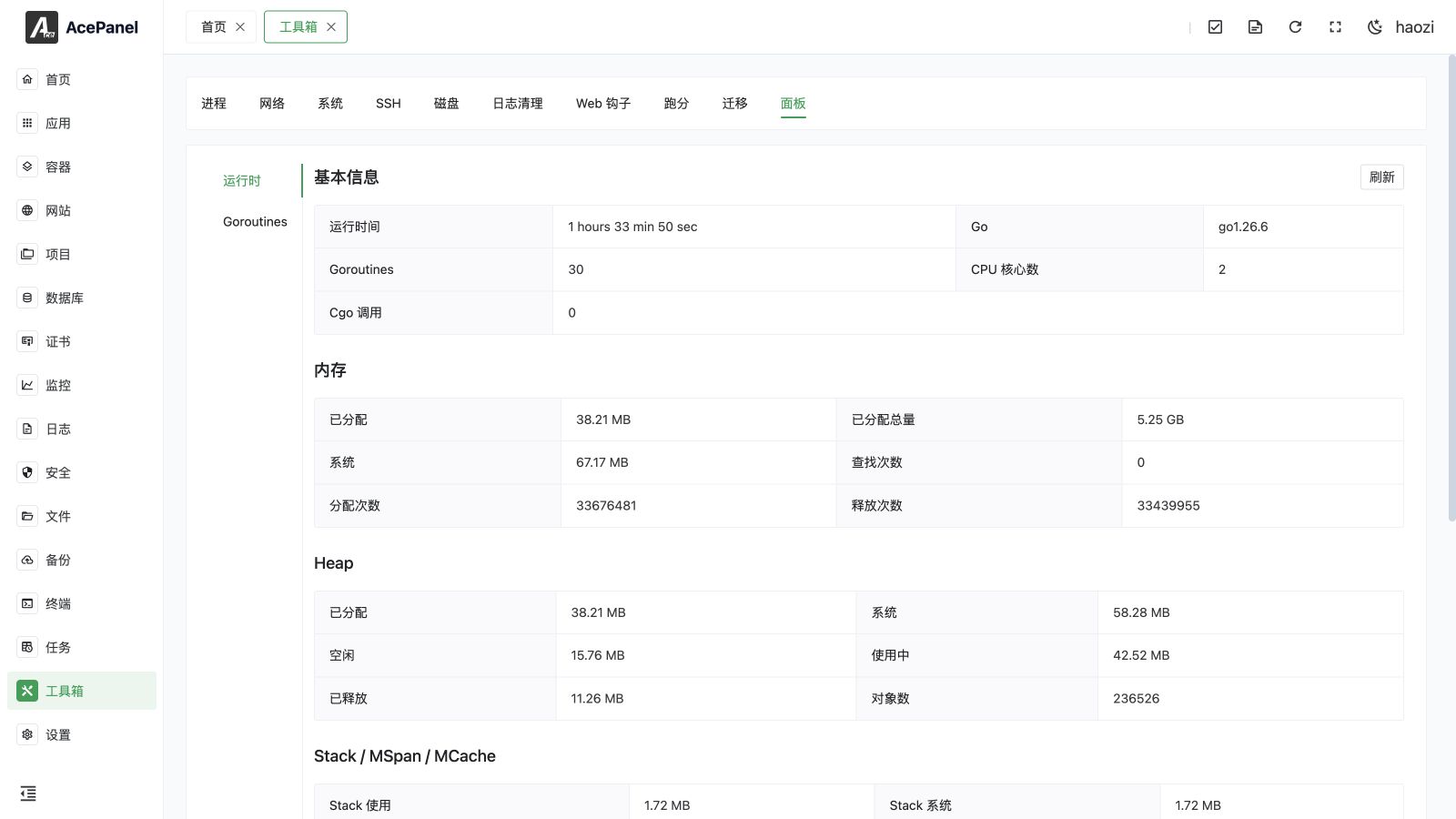
This page shows runtime diagnostics for the AcePanel Go process, including memory allocation, heap and stack use, garbage collection, and goroutines. These values describe the panel process, not the whole server. Use System Monitoring and Processes for host-wide analysis.
The Panel page exposes the AcePanel process's own Go runtime statistics and live goroutine stack traces. It is mainly useful for diagnosing the panel itself, for example when investigating memory growth, garbage collection behavior, or stuck goroutines.
You can open it from the Toolbox, then select the Panel tab. The page is split into two sub-tabs: Runtime and Goroutines. The Runtime sub-tab is shown by default.
TIP
All data on this page describes the AcePanel backend process (ace) itself, not your websites, databases, or other applications. To inspect arbitrary system processes, use the Process Management page instead.
Runtime
The Runtime sub-tab reads the panel process's runtime and memory statistics on demand. Click Refresh in the Basic Info header to reload all values.
The data is grouped into the following sections.
Basic Info
| Field | Description |
|---|---|
| Uptime | How long the panel process has been running |
| Go | Go version the panel was built with |
| Goroutines | Current number of running goroutines |
| CPU Cores | Number of logical CPUs available to the process |
| Cgo Calls | Total number of cgo calls made by the process |
Memory
General memory statistics for the process.
| Field | Description |
|---|---|
| Allocated | Bytes of allocated heap objects currently in use |
| Total Allocated | Cumulative bytes allocated for heap objects over time |
| System | Total bytes of memory obtained from the operating system |
| Lookups | Number of pointer lookups performed by the runtime |
| Mallocs | Cumulative count of heap objects allocated |
| Frees | Cumulative count of heap objects freed |
Heap
Detailed heap allocation statistics.
| Field | Description |
|---|---|
| Allocated | Bytes of allocated heap objects currently in use |
| System | Bytes of heap memory obtained from the system |
| Idle | Bytes in idle (unused) heap spans |
| In Use | Bytes in in-use heap spans |
| Released | Bytes of physical memory returned to the OS |
| Objects | Number of allocated heap objects |
Stack / MSpan / MCache
Statistics for stack memory and the runtime's internal allocator structures.
| Field | Description |
|---|---|
| Stack In Use | Bytes in use by stack spans |
| Stack Sys | Bytes of stack memory obtained from the system |
| MSpan In Use | Bytes of allocated mspan structures |
| MSpan Sys | Bytes obtained from the system for mspan structures |
| MCache In Use | Bytes of allocated mcache structures |
| MCache Sys | Bytes obtained from the system for mcache structures |
| BuckHash Sys | Bytes used by the profiling bucket hash table |
| Other Sys | Bytes of memory used for other runtime allocations |
GC
Garbage collection statistics.
| Field | Description |
|---|---|
| GC Runs | Total number of completed GC cycles |
| Forced GC Runs | Number of GC cycles forced by the application |
| GC Pause Total | Cumulative time spent in stop-the-world GC pauses |
| Last GC | Timestamp of the most recent garbage collection |
| Next GC Target | Heap size target that will trigger the next GC |
| GC Sys | Bytes of memory used for GC metadata |
| GC CPU Fraction | Fraction of total CPU time used by the GC, shown as a percentage |
TIP
Memory and heap values are displayed in human-readable units (B, KB, MB, GB, TB). Durations and GC pause times are formatted automatically (for example ns, us, ms, or s), and uptime is shown as days, hours, minutes, and seconds.
Goroutines
The Goroutines sub-tab dumps the full stack trace of every goroutine currently running inside the panel process.
For performance reasons this data is not loaded automatically. It is fetched the first time you open the sub-tab, and you can reload it at any time with the Refresh button. A counter at the top shows the total number of goroutines (Total: N).
Each goroutine is listed as a collapsible item showing:
- State: the goroutine's scheduler state (for example
running,IO wait,select,chan receive). Goroutines in therunningstate are highlighted. - goroutine ID: the runtime-assigned goroutine identifier.
Expand an item to view the goroutine's full stack trace, rendered as Go source for readability.
TIP
This view is primarily a debugging aid. A large or steadily growing number of goroutines may indicate a leak and is useful information when reporting an issue.
Notes
- This page reflects the internal state of the AcePanel process and is intended for diagnostics, not routine administration.
- The values are point-in-time snapshots taken when the page is loaded or refreshed; they are not updated live.
- Capturing all goroutine stacks briefly pauses the runtime, so avoid refreshing the Goroutines sub-tab repeatedly on a busy server.