
Network
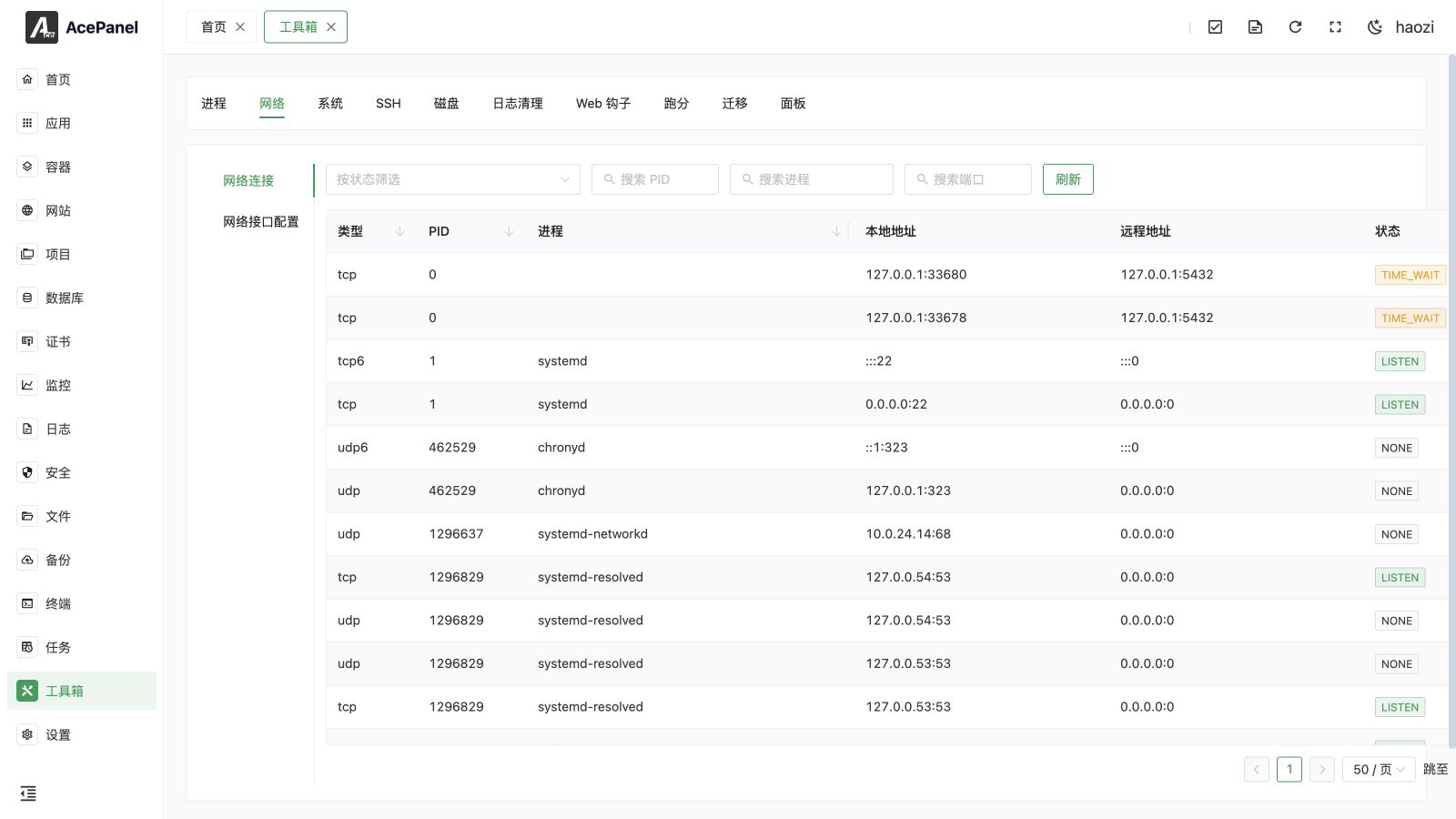
The Network tool combines a read-only connection inspector with guarded network-interface configuration. Open Toolbox > Network.
Network Connections
The connection list shows current TCP, TCP6, UDP, and UDP6 sockets with local address, remote address, state, PID, and process. Search by PID, partial process name, or local/remote port, combine state filters, sort supported columns, refresh the snapshot, and change the page size.
Common states include LISTEN, ESTABLISHED, TIME_WAIT, CLOSE_WAIT, SYN_SENT, SYN_RECV, FIN_WAIT1, FIN_WAIT2, LAST_ACK, CLOSING, and NONE. UDP commonly has no connection state. Process ownership can be empty if the process exited between sampling or the operating system did not expose it.
The connection list does not terminate sockets. Open Processes when you need process details or signal operations.
Network Interface Configuration
The interface section shows the detected configuration manager, interface type, MAC address, MTU, and current IPv4 and IPv6 addresses.
AcePanel can safely edit supported configurations managed by:
- NetworkManager;
- netplan;
- ifupdown configurations that pass AcePanel's safety parser.
For IPv4 and IPv6 independently, choose automatic or manual addressing and configure CIDR addresses, the default gateway, DNS servers, and whether automatically assigned DNS is accepted. ifupdown does not expose automatic-DNS fields that it cannot represent.
Unsupported Configurations
AcePanel displays Unsupported instead of attempting an unsafe rewrite when it cannot reliably round-trip the active configuration. Examples include multiple files defining the same interface, inherited or mapping-based ifupdown definitions, and a NetworkManager interface without an editable active connection profile.
Manage an unsupported interface with its native operating-system tools or simplify the configuration first. Do not overwrite it with a guessed panel form.
Safe Apply and Automatic Rollback
Changing the primary address, gateway, route source, or automatic-address setting can immediately disconnect the panel and SSH. Keep a console or provider recovery channel available.
When a change is applied, AcePanel starts a 30-second confirmation window:
- Verify that the panel, SSH, gateway, DNS, and required services remain reachable.
- Click Keep change within 30 seconds to retain the new configuration.
- Click Roll back now to restore the previous configuration immediately.
- If no confirmation arrives before the countdown ends, AcePanel automatically rolls back.
Automatic rollback reduces risk but cannot guarantee recovery from every driver, routing, provider, or operating-system failure. Test remotely managed servers during a maintenance window.
Validation
After keeping a change, verify:
- the expected IPv4 and IPv6 addresses and MTU;
- the default gateway and route table;
- DNS resolution using every configured resolver;
- panel and SSH access from a fresh connection;
- inbound services through both the system firewall and cloud security group;
- outbound access required by package managers, backups, mail, and monitoring.
Troubleshooting
- Unsupported: inspect the named manager's source files and remove ambiguous multi-file, inheritance, or mapping constructs only if you understand their effect.
- Change rolled back: determine which address, gateway, DNS, or DHCP condition broke connectivity before trying again.
- Panel reachable but a service is not: check its bind address and Security rules for both address families.
- An old address remains: refresh the interface list and inspect the native manager; temporary kernel addresses and persistent configuration are different states.