
Database
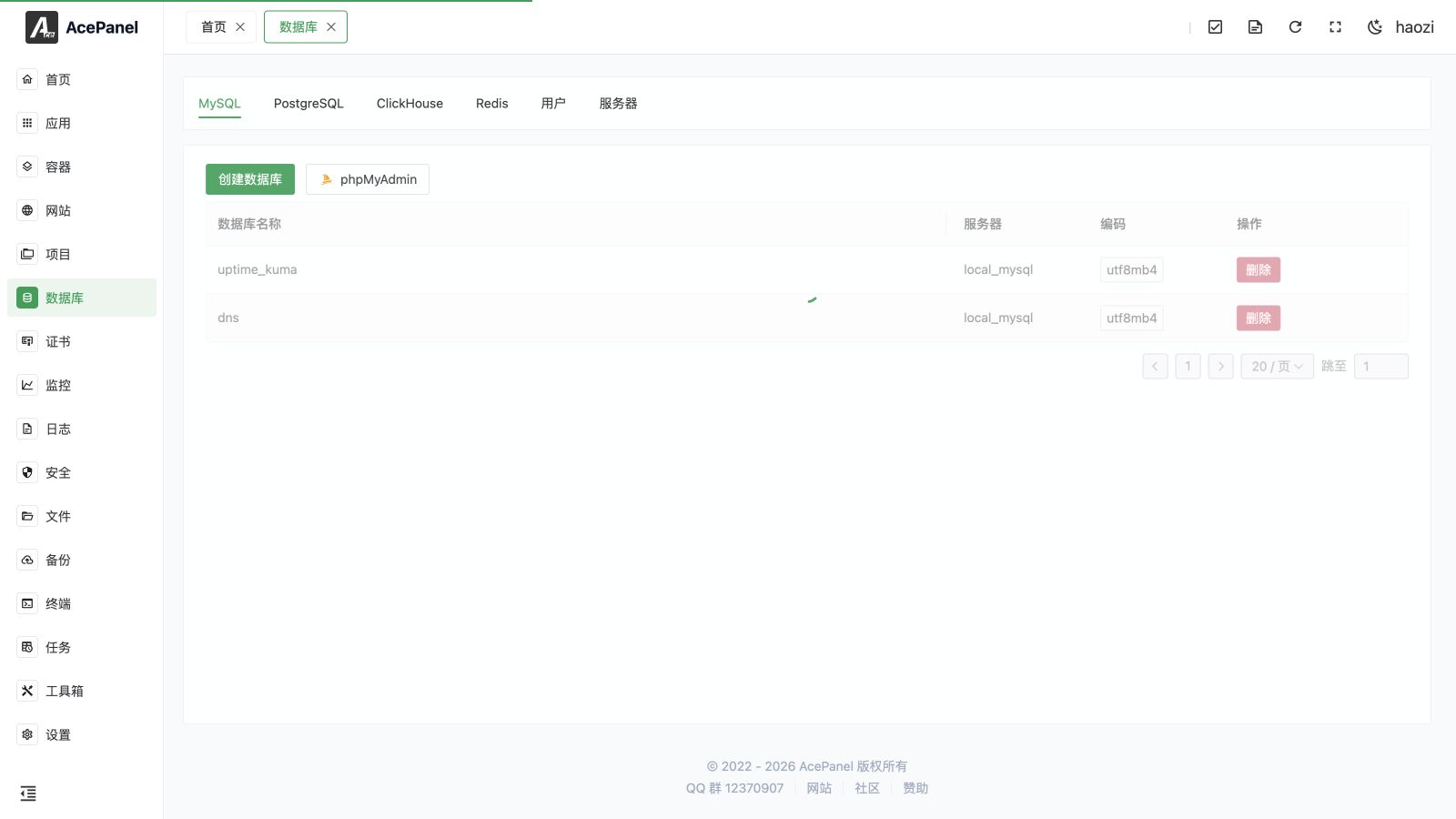
The database module is used to manage relational databases (MySQL, MariaDB, PostgreSQL, etc.), NoSQL and analytical databases (MongoDB, ClickHouse), search engines (Elasticsearch), key-value stores (Redis), and embedded databases (SQLite). It supports creating databases, managing users, browsing data, and configuring database servers.
Prerequisites
Before using the database feature, you need to install the corresponding database software first:
- Go to Apps > Native Applications
- Install the database you need, such as Percona, MySQL, MariaDB, PostgreSQL, MongoDB, ClickHouse, Elasticsearch, OpenSearch, Redis, or Valkey
Feature Overview
The database module adds a type tab only when at least one server of that type exists. The available type tabs are followed by User and Server:
| Feature | Description |
|---|---|
| Database | Create and manage databases for the selected type |
| User | Manage database users and permissions |
| Server | Manage database server connections |
| pgAdmin | Open and maintain the PostgreSQL Web management tool |
The Elasticsearch and Redis tabs provide an online data browser for managing indices/documents and key-value data directly, rather than the create-database workflow.
Supported Databases
| Database | Description |
|---|---|
| MySQL | The world's most popular open-source relational database |
| MariaDB | Open-source fork of MySQL, fully compatible with MySQL |
| Percona | High-performance fork of MySQL, suitable for high-load scenarios |
| PostgreSQL | Powerful open-source object-relational database |
| ClickHouse | Column-oriented database for real-time analytics on huge datasets |
| MongoDB | Document database for storing massive, unstructured data |
| Elasticsearch | Distributed search and analytics engine for full-text search |
| Redis | In-memory key-value store, commonly used for caching |
| SQLite | Lightweight embedded database stored in a single file |
MariaDB and Percona are managed under the MySQL tab, as they are wire-compatible with MySQL.
Quick Start
Create Database
- Go to the Database page and switch to the tab of the database type you want (MySQL, PostgreSQL, ClickHouse, or MongoDB)
- Click Create Database
- Select the server
- Enter the database name
- Optionally toggle Create User, or specify an existing authorized user
- Click Submit
Create User
- Switch to the User tab
- Click Create User
- Select the server, then enter username and password
- Set privileges (database names the user can access; non-existent databases are created automatically)
- Click Submit
Note
User management is only available for MySQL, PostgreSQL, and ClickHouse. Other database types do not expose a user management entry.
Connect to Database
The MySQL database list can open phpMyAdmin and lets you choose the MySQL server to connect to. The PostgreSQL list opens pgAdmin after it is installed. Both tools follow the panel language. Keep their ports private or restricted with an allowlist.
Local Connection
Host: 127.0.0.1 or localhost
Socket: Percona/MySQL/MariaDB /tmp/mysql.sock, PostgreSQL /tmp/.s.PGSQL.5432
Default ports by database type:
| Database | Default Port |
|---|---|
| Percona/MySQL/MariaDB | 3306 |
| PostgreSQL | 5432 |
| ClickHouse | 8123 |
| MongoDB | 27017 |
| Elasticsearch | 9200 |
| Redis | 6379 |
Remote Connection
To connect to the database remotely:
- Open the database port in the firewall
- Create a user that allows remote access
For MySQL (including MariaDB and Percona), the Create User form exposes a Host selector with three options that control where the user may connect from:
| Host option | Meaning |
|---|---|
| Local (localhost) | Only allows connections from the local machine |
| All (%) | Allows connections from any host (required for remote access) |
| Specific | Allows connections only from the host address you enter |
To enable remote access for a MySQL user, choose All (%) (or Specific and enter the client address). PostgreSQL and ClickHouse users do not have this per-host setting, so the Host selector does not appear for those types.
Security Notice
It is not recommended to expose database ports to the public network. For remote management, it is recommended to use SSH tunnels or VPN.
Performance and Maintenance
These tools are on the installed database application's Manage page under Apps, rather than the database/user list or a remote server registration. Open the corresponding native application to manage its local instance.
MySQL, MariaDB, and Percona
The Performance tab includes:
- Processes: inspect connections, users, databases, running statements, and duration; terminate a selected connection when necessary.
- Transactions & Locks: inspect active transactions and lock waits, identify the blocking connection, and terminate the blocker after reviewing its query.
- Top SQL: compare statement calls, total and mean execution time, and rows sent or examined; reset accumulated statistics when starting a new observation period. It requires
performance_schema. The enable action changes configuration and requires a service restart; it also increases memory usage.
The Maintenance tab includes:
- Table Maintenance: filter by database, inspect table size and fragmentation, and run maintenance on one table or multiple selected tables. Available operations include
OPTIMIZEandANALYZE. - Binlog: view binary-log files and sizes. Purge to Here removes logs before the selected file; confirm they are no longer needed for replication or recovery.
- Replication: inspect the source host, replication delay, IO/SQL thread state, and the last error on a replica.
Table-maintenance operations run as panel tasks. Inspect the task log for their results.
PostgreSQL
The Extensions tab lists extension availability and installed versions. Install or reinstall extension packages through panel tasks, then use Enable to select the database where CREATE EXTENSION will run. Enabling an extension in template1 makes newly created databases inherit it. Some extensions also require a PostgreSQL restart.
The Performance tab provides Sessions and Top SQL. Sessions show wait events, blockers, transaction duration, and query duration and can be terminated. Top SQL uses pg_stat_statements; enabling it adds the module to shared_preload_libraries and requires restarting PostgreSQL.
Under Maintenance > Table Bloat, select a database to inspect table size, live/dead tuples, and the last vacuum/analyze time. Run VACUUM, VACUUM FULL, ANALYZE, or pg_repack on a table or selection. pg_repack requires its extension to be installed. These operations run as panel tasks. VACUUM FULL rewrites the table and holds an exclusive lock, blocking reads and writes until it finishes.
The WAL tab shows WAL size, archive success/failure counts, replication slots and retained WAL, and replication status. Delete a replication slot only when its consumer no longer needs it.
Redis and Valkey
Open Performance to inspect Slow Log, Clients, and Memory. You can reset the slow log, terminate a client, inspect memory diagnostics, and submit Scan Big Keys as a panel task. Follow the task log for scan output. Review service load before scanning a large dataset.
Recommended Configuration
On application pages with Parameter Tuning, use Generate Recommended Configuration where available to fill recommended values from the memory budget, CPU count, disk type, and application scenario. Review the generated values and save manually. Recommendations are a starting point and do not measure the application's actual workload.
Next Steps
- Database Management - Learn how to create and manage databases
- User Management - Learn how to manage database users
- Server Management - Learn how to manage database servers