
Python Project
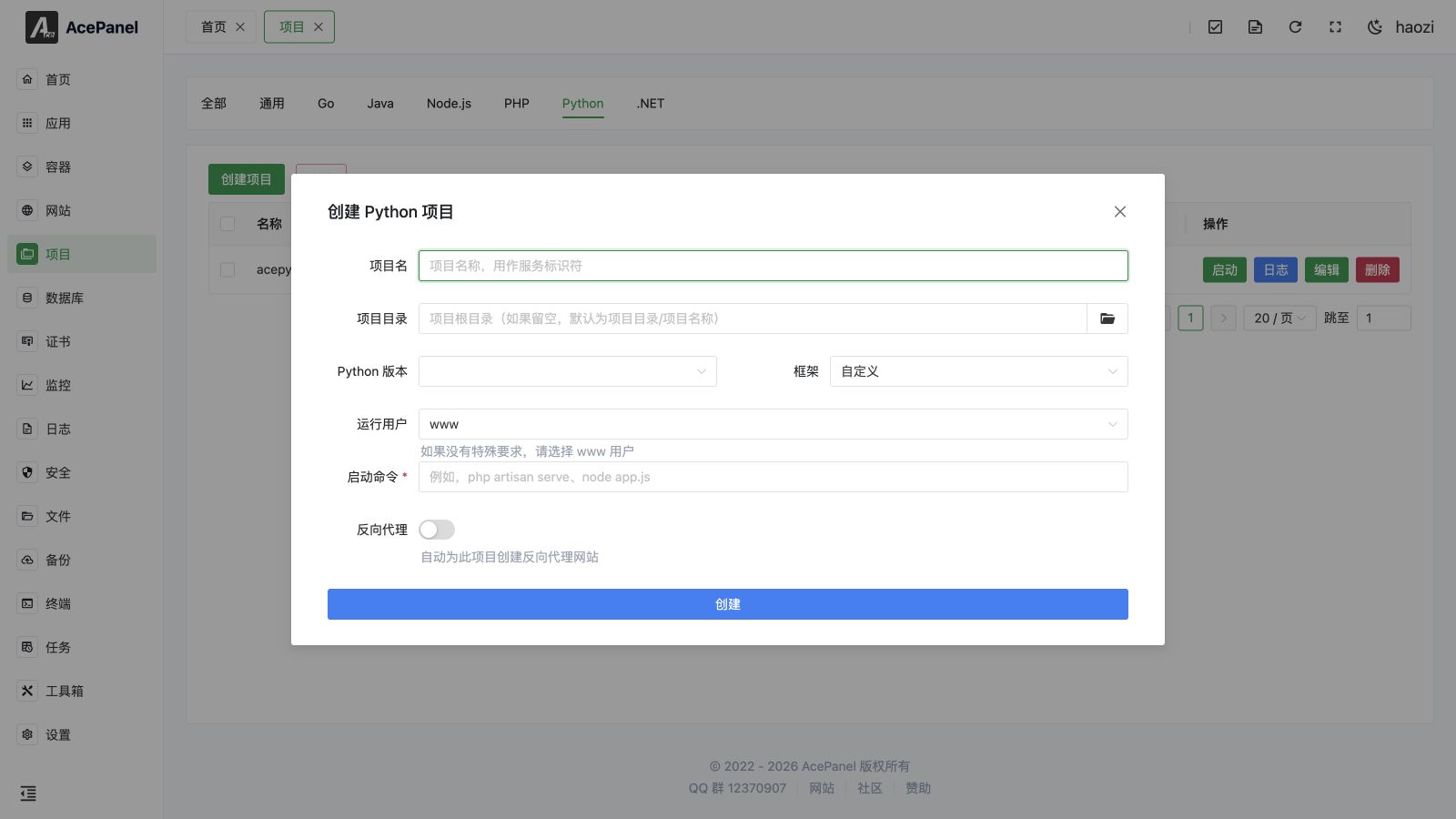
Python projects are used to deploy Django, Flask, FastAPI, and other Python web applications.
Prerequisites
- Install Python runtime: Apps > Operating Environment > Python
- Project source code
Deployment Steps
- Upload project code to the server
- Create virtual environment and install dependencies:
cd /opt/ace/projects/myapp
python3.13 -m venv venv
source venv/bin/activate
pip install -r requirements.txt- Go to the Project page, open the Python tab, and click Create Project:
- Project Name:
myapp(used as the systemd service identifier) - Project Directory:
/opt/ace/projects/myapp(if left empty, defaults to the project directory plus the project name) - Python Version and Framework: selecting an installed version together with a framework preset (Django, Flask, FastAPI, Tornado, Sanic, aiohttp, Gunicorn) auto-fills the start command; choose Custom to write it yourself
- Run User: defaults to
www(usewwwif you have no special requirements) - Start Command: see examples below
- Project Name:
- Enable Reverse Proxy in the create form to automatically create a reverse proxy website for the project; fill in the Domain and the Project Port your app listens on
The create form only collects the essentials needed to get the service running. After the project is created, open Edit to configure the full set of advanced systemd options described in Advanced systemd Settings.
Startup Command Examples
The framework presets in the create form generate commands using the panel's managed interpreter, such as python3.13 -m flask run --host=0.0.0.0. The examples below instead point at the virtual environment binaries (venv/bin/...), which is recommended when your project relies on dependencies installed inside the virtual environment.
Django
# Development server (not recommended for production)
/opt/ace/projects/myapp/venv/bin/python manage.py runserver 0.0.0.0:8000

# Using Gunicorn (recommended)
/opt/ace/projects/myapp/venv/bin/gunicorn myproject.wsgi:application -b 0.0.0.0:8000 -w 4

# Using uWSGI
/opt/ace/projects/myapp/venv/bin/uwsgi --http 0.0.0.0:8000 --module myproject.wsgi
Flask
# Development server (not recommended for production)
/opt/ace/projects/myapp/venv/bin/python app.py

# Using Gunicorn (recommended)
/opt/ace/projects/myapp/venv/bin/gunicorn app:app -b 0.0.0.0:8000 -w 4
FastAPI
# Using Uvicorn
/opt/ace/projects/myapp/venv/bin/uvicorn main:app --host 0.0.0.0 --port 8000

# Using Gunicorn + Uvicorn Workers (recommended)
/opt/ace/projects/myapp/venv/bin/gunicorn main:app -b 0.0.0.0:8000 -w 4 -k uvicorn.workers.UvicornWorker
Common Framework Configurations
Django Production Configuration
settings.py:
DEBUG = False
ALLOWED_HOSTS = ['your-domain.com']
STATIC_ROOT = '/opt/ace/projects/myapp/static/'
Collect static files:
/opt/ace/projects/myapp/venv/bin/python manage.py collectstaticFastAPI Example
from fastapi import FastAPI

app = FastAPI()

@app.get("/")
def read_root():
    return {"Hello": "World"}
Gunicorn Configuration
Create gunicorn.conf.py:
bind = "0.0.0.0:8000"
workers = 4
worker_class = "sync"  # Or "uvicorn.workers.UvicornWorker" for FastAPI
timeout = 30
keepalive = 2
Startup command:
/opt/ace/projects/myapp/venv/bin/gunicorn -c gunicorn.conf.py myproject.wsgi:applicationVirtual Environment
It is strongly recommended to use virtual environments to isolate project dependencies:
# Create virtual environment
python3.13 -m venv venv

# Activate virtual environment
source venv/bin/activate

# Install dependencies
pip install -r requirements.txt

# Deactivate virtual environment
deactivate
Managing the Service
Each Python project is run as a systemd service. The project list on the Python tab shows the Status (Running / Stopped / Failed) and offers the following actions per row:
- Start / Stop: toggle the service. A stopped service shows Start; a running service shows Stop.
- Restart: restart the service (only shown while the service is running).
- Reload: reload the service without a full restart (only shown while the service is running). This sends the configured Reload Command; if your app does not support reloading, use Restart instead.
- Logs: open a real-time log viewer that streams the service journal output.
- Edit: open the project editor with the advanced systemd options (see below).
- Delete: remove the project. A confirmation with a 5-second countdown is required.
The Autostart switch in each row enables or disables starting the service automatically on boot. You can also select multiple projects and use the top Delete button to remove them in bulk (also guarded by a 5-second countdown).
Advanced systemd Settings
Open Edit on a project to access settings that are not available in the create form. The editor is organized into tabs, and every option is written into the project's generated systemd unit file.
Basic Settings
| Field | Description |
|---|---|
| Project Name | Service identifier. |
| Description | Free-text description of the project. |
| Project Directory | The project root directory. |
| Working Directory | The service working directory (WorkingDirectory). Optional; defaults to the project directory when left empty. |
| Run User | The user the service runs as (www, root, nobody, or a custom user). |
Runtime Settings
| Field | Description |
|---|---|
| Start Command | The main command that starts your app (ExecStart). |
| Pre-start Command | Command to run before starting (ExecStartPre). |
| Post-start Command | Command to run after starting (ExecStartPost). |
| Stop Command | Custom stop command (ExecStop). |
| Reload Command | Custom reload command (ExecReload), used by the Reload action. |
| Restart Strategy | When systemd restarts the service: No restart, Always, On failure, On abnormal, On abort, or On success (Restart). |
| Restart Interval | Delay before restarting, e.g. 5s, 1min (RestartSec). |
| Max Restarts | Maximum restart attempts within the burst window (StartLimitBurst). |
| Start Timeout (s) | Time allowed for startup before systemd considers it failed (TimeoutStartSec). |
| Stop Timeout (s) | Time allowed for shutdown before systemd force-kills the service (TimeoutStopSec). |
| Standard Output / Standard Error | Where the service stdout/stderr is sent: journal, syslog, kmsg, null, or a file via append:/var/log/... or truncate:/var/log/... (StandardOutput / StandardError). |
| Environment Variables | Key/value pairs injected into the service environment (Environment). |
Dependencies
Control startup ordering and dependencies on other systemd units. Common values are network.target, mysqld.service, postgresql.service, and redis.service.
| Field | Description |
|---|---|
| Requires | Strong dependencies (Requires). The service fails if these units are not available. |
| Wants | Weak dependencies (Wants). The service still starts if these fail. |
| After | Start this service after the listed units (After). |
| Before | Start this service before the listed units (Before). |
Resource Limits
| Field | Description |
|---|---|
| Memory Limit (MB) | Maximum memory the service may use (MemoryLimit). Set to 0 to disable the limit. |
| CPU Quota | CPU allowance, e.g. 50% or 200% (CPUQuota). 100% equals one CPU core. |
Security Settings
These options increase service isolation but may break functionality, so test thoroughly before enabling them in production.
| Field | Description |
|---|---|
| No New Privileges | Prevents the service and its children from gaining new privileges (NoNewPrivileges). |
| Protect /tmp | Gives the service a private /tmp (ProtectTmp). |
| Protect /home | Restricts access to /home (ProtectHome). |
| Protect System | Makes parts of the filesystem read-only (ProtectSystem): true makes /usr and /boot read-only; full additionally protects /etc; strict makes the entire filesystem read-only. |
| Read-Write Paths | Paths the service is allowed to write to (ReadWritePaths), useful with Protect System. |
| Read-Only Paths | Paths the service may only read from (ReadOnlyPaths). |
Common Issues
Dependency Installation Failed
Some packages require compilation, ensure necessary system dependencies are installed:
# AlmaLinux/Rocky Linux
yum install gcc python3-devel

# Ubuntu/Debian
apt install gcc python3-dev
Static Files 404
Django production environment needs to configure Nginx to serve static files directly, or use WhiteNoise.
Database Connection Issues
Check database configuration and network connection, ensure the database service is running properly.